Finding your account information
How do I find my DataSpring ID?
- You can look up your DataSpring ID on the DataSpring website.
- If you still need help, contact your Headway Provider Growth Associate.
How do I find my username?
How do I find my password?
How do I change the email address on my DataSpring account?
- If your account is tied to an email you can’t access, call DataSpring at 888-599-1771 to update it.
Account issues
I have duplicate DataSpring accounts. How do I merge them?
- Call DataSpring at 888-599-1771 to request a merge.
- The process can take a few days to complete.
I’m new to DataSpring and can’t link my account in Headway. What should I do?
- Upload all required documents in the Documents section of DataSpring (typically your malpractice policy and state authorization forms).
- Re-attest your account once documents are uploaded.
- Wait about 2 business days for DataSpring to review and approve. After approval, you’ll be able to link your account in your Headway profile.
Troubleshooting DataSpring x Headway
At intake
Why isn’t my intake form refreshing after I update DataSpring?
- Confirm you saved your changes in DataSpring.
- Re-attest your account.
- Once re-attested, your intake form should refresh with the updates.
What do I write in the “Practice Location” section?
For Sigmund attestations
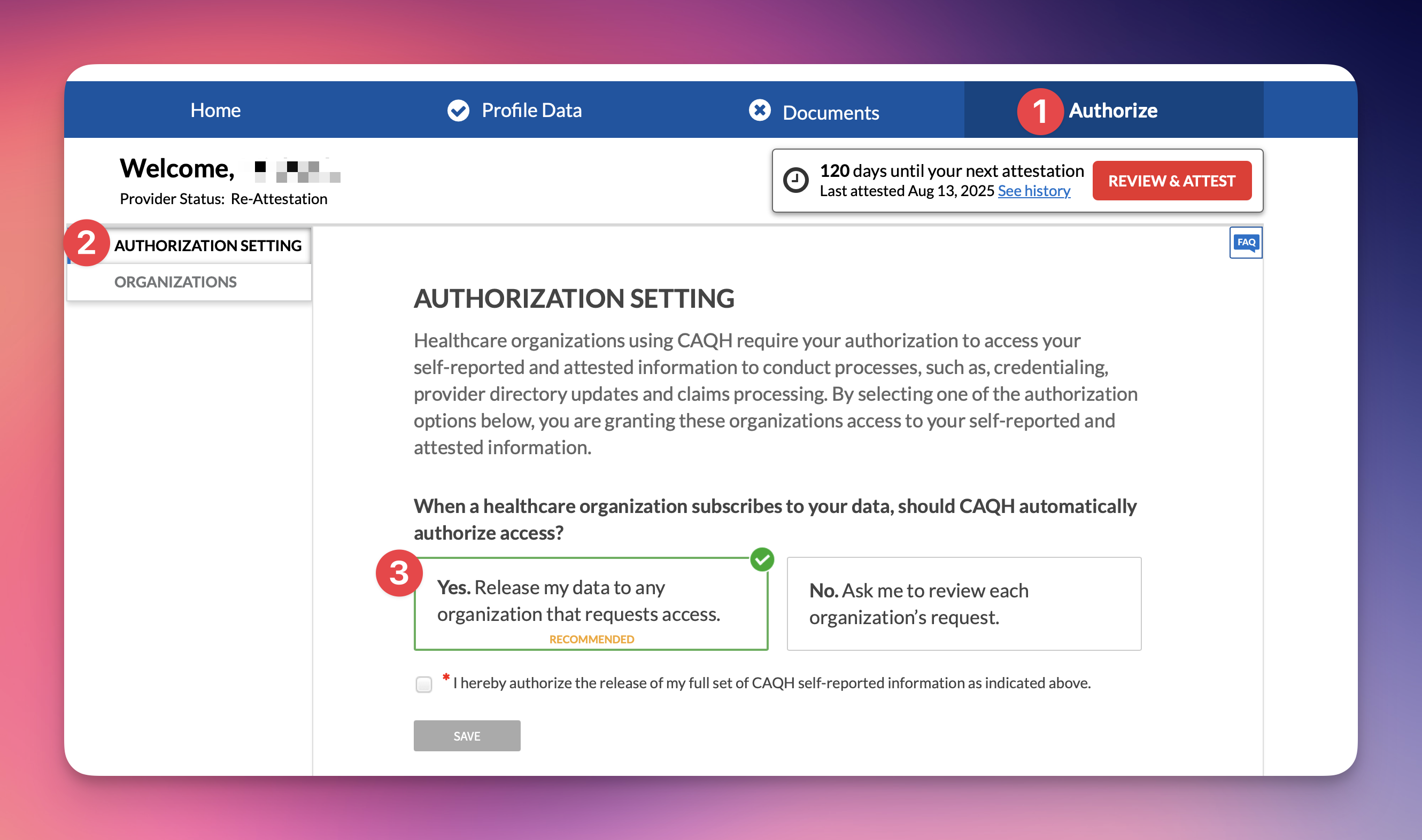
How and why do I need to grant authorization access on DataSpring?
- Insurers use DataSpring to review and verify your professional and practice details. This access is required for credentialing and re-credentialing across the healthcare system.
- Setting your DataSpring authorization setting to “Yes, I grant access” allows Headway and our payer partners to view your profile as part of this process. If access is denied, credentialing may be delayed and your in-network status may be at risk.
- To update the authorization setting:
- Log in to your DataSpring account
- Go to the Authorization tab
- Open the Authorization setting page in the left menu
- Select Yes - release my data to any organization that requests access
- Re-attest your DataSpring profile
How do I add a Headway practice location on DataSpring?
- Insurers use the practice location listed under the Headway Tax ID to confirm that you are actively practicing with Headway in a given state. If a Headway practice location is missing or inactive in your DataSpring profile, your credentialing may be delayed.
- For step-by-step instructions, visit our DataSpring Headway practice location details article.
Disclaimer: This document is for educational purposes only and is not intended as professional or legal advice.
It may contain errors or missing information, and recent changes in policies, regulations, or payer requirements may not be reflected.
Because requirements vary by organization and jurisdiction, please consult legal counsel, the appropriate regulatory or licensing authority or your designated Headway contact for guidance specific to your situation.